
The Micron 7450 PRO 1.92 TB is the best commercial SSD for a medical imaging cart when its computer supports M.2 22110. It combines enterprise power-loss protection, suitable write endurance, predictable performance and optional TCG Opal security. For computers limited to M.2 2280, the 960 GB version is the preferred alternative.

What Changed in 2026?
Medical imaging carts increasingly run browser-based PACS viewers, DICOM applications and local image-processing software. This changes how hospitals should evaluate storage.
Current procurement priorities include:
- Larger working caches: CT, MRI and digital pathology workflows can generate substantial temporary data.
- Better power protection: Mobile carts may experience battery depletion, docking failures or unplanned shutdowns.
- Managed encryption: Local image caches may contain electronic protected health information.
- Thermal compatibility: Compact and fanless computers may restrict sustained SSD performance.
- Fleet monitoring: Hospital IT teams need temperature, health and remaining-life information across multiple carts.
The fastest retail SSD is rarely the most suitable choice. Hospitals should place data integrity and manageability ahead of benchmark speed.
Which Commercial SSD Is the Best Overall Choice?
The Micron 7450 PRO 1.92 TB M.2 22110 is the best overall option for a medical imaging cart with a compatible enterprise workstation.
Micron specifies full power-loss protection, end-to-end data-path protection, a one-drive-write-per-day endurance rating and TCG Opal 2.01 options. The 7450 PRO is available in two M.2 formats:
- M.2 2280: 480 GB and 960 GB
- M.2 22110: 960 GB, 1.92 TB and 3.84 TB
The drive also offers sequential read speeds of up to 6,800 MB/s, sequential writes of up to 5,600 MB/s and a stated mean time to failure of two million device hours. These figures come from the Micron 7450 Technical Product Specification, Revision C, published in February 2026.

Why Is 1.92 TB the Preferred Capacity?
A 1.92 TB SSD provides enough space for the operating system, imaging applications and a controlled local cache without encouraging unnecessary long-term storage on the cart.
It is suitable for:
- Prefetching several CT or MRI studies before clinical rounds
- Caching current cases during temporary network interruptions
- Running local reconstruction or image-analysis applications
- Maintaining at least 20% free capacity for stable SSD performance
The 3.84 TB version is justified only when the hospital has measured the daily imaging workload and approved an extended local retention period.
How Do the Main Commercial SSD Options Compare?
| SSD model | M.2 format | Maximum M.2 capacity | Endurance | Power-loss protection | Recommended use |
|---|---|---|---|---|---|
| Micron 7450 PRO | 2280 or 22110 | 3.84 TB | 1 DWPD | Full enterprise PLP | Large DICOM cache and imaging applications |
| Kingston DC2000B | 2280 | 960 GB | 0.4 DWPD | Hardware PLP | PACS viewer and short-term cache |
| Samsung PM9D3a | Enterprise M.2 | 1.92 TB | Part-number dependent | Verify exact model | New PCIe 5.0 workstation projects |
Manufacturer specifications were reviewed on July 30, 2026. Buyers should confirm the exact part number because capacity, encryption, endurance and physical dimensions can vary within the same SSD family.
The Kingston DC2000B is a practical M.2 2280 alternative. Its 960 GB version has hardware power-loss protection, 700 TB written endurance and a five-year limited warranty. However, its capacity may be restrictive for departments that prefetch numerous large studies.
The Samsung PM9D3a provides greater PCIe 5.0 performance and M.2 capacities up to 1.92 TB. Before ordering, verify the M.2 length, encryption capability, thermal requirements and availability of the required enterprise part number.
Does a Faster SSD Improve Hospital Network Roaming?
No. SSD performance does not control Wi-Fi roaming, PACS latency or access-point handover.
A PCIe 4.0 SSD can read data at several thousand megabytes per second. In contrast, a 1-gigabit network has a theoretical limit of approximately 125 MB/s before overhead. Hospital Wi-Fi performance may be lower because of signal conditions, authentication and concurrent users.
To improve roaming performance, evaluate:
- Wireless adapter: Use an enterprise Wi-Fi adapter approved by hospital IT.
- Access-point coverage: Test corridors, lifts, patient rooms and imaging departments.
- Authentication delay: Measure reconnection time when the cart changes access points.
- PACS response: Separate server delay from wireless and local storage performance.
- Offline behaviour: Confirm how the application handles interrupted transfers.
The SSD improves local application response and cached-image access. It cannot correct a poorly configured wireless network.
How Much SSD Capacity Does a Medical Imaging Cart Need?
A 960 GB SSD is sufficient for most carts that stream images from PACS and delete temporary files automatically. Choose 1.92 TB for larger studies, longer cache periods or local image processing.
Use this planning formula:
Required capacity = daily cached data × retention days × 1.25
The additional 25% accounts for the operating system, clinical software, updates, logs and working space.
A practical capacity guide is:
- 480 GB: Basic viewer with little persistent caching
- 960 GB: General PACS access and short-term DICOM cache
- 1.92 TB: Large CT or MRI studies and temporary offline continuity
- 3.84 TB: Specialist imaging or local AI workloads with approved retention controls
More storage is not automatically better. A larger SSD can increase the volume of patient information exposed if a cart is lost or accessed without authorization.
Which Security Features Should Hospitals Require?
A medical imaging cart SSD should support the hospital’s wider endpoint-security system. Hardware encryption alone does not establish compliance.
Require the following controls:
- Full-disk encryption with centrally managed recovery keys
- Automatic screen locking after an approved period of inactivity
- Secure boot and restricted BIOS access
- Signed SSD firmware and controlled firmware updates
- Role-based access to PACS and local imaging applications
HHS confirms that mobile devices may access electronic protected health information when appropriate administrative, physical and technical safeguards protect both the device and the connected system. The agency also states that HIPAA does not endorse one specific technology (HHS Mobile Device and Cloud Guidance, reviewed January 9, 2023).
Therefore, TCG Opal capability is useful only when it is correctly configured and supported by the hospital’s key-management process.
How Should the SSD and Medical Cart Be Evaluated Together?
Hospitals should qualify the SSD inside the final cart computer rather than evaluating the drive separately.
The approval process should include:
- Confirm whether the computer supports M.2 2280 or M.2 22110.
- Check heatsink clearance and airflow inside the computer enclosure.
- Measure SSD temperature while retrieving and processing large studies.
- Test sudden power interruption and low-battery shutdown.
- Verify that the cart battery can support the complete workstation load.
- Record the approved SSD part number in the project bill of materials.
This is where cart configuration matters. LUVXOM medical computer carts can be matched with different workstation, monitor, battery and cable-management arrangements. For an OEM project, the buyer should provide LUVXOM with the computer dimensions, total power demand, mounting interface, cable layout and expected operating time. LUVXOM can then design the physical cart configuration around the approved computing system.
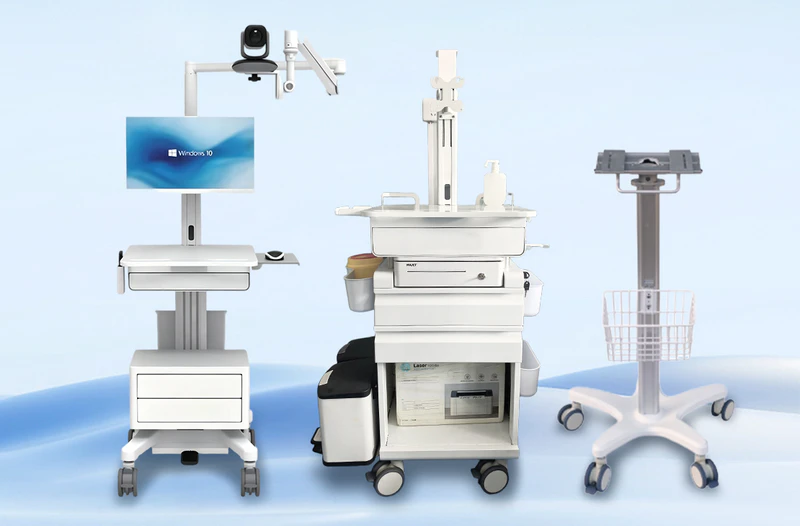
The SSD remains part of the computer specification. The cart manufacturer is responsible for ensuring that the computer, battery, mounting structure and ventilation arrangement work together safely.
Conclusion: Which SSD Is the Best Choice?
The Micron 7450 PRO 1.92 TB M.2 22110 is the best commercial SSD for medical imaging carts that support the longer enterprise form factor. It provides a sound balance of capacity, write endurance, power-loss protection and configurable security.
For an M.2 2280 computer, choose the Micron 7450 PRO 960 GB. The Kingston DC2000B 960 GB is an appropriate alternative for PACS viewing carts with moderate local-cache requirements.
The final decision should follow computer compatibility, thermal testing, encryption validation and a real hospital network trial.
Frequently Asked Questions
Can a consumer SSD be used in a medical imaging cart?
Yes, but it is not recommended for managed hospital fleets. Many consumer SSDs lack hardware power-loss protection and enterprise health-monitoring functions.
Is 960 GB enough for a PACS workstation cart?
Yes. A 960 GB SSD is generally sufficient when images remain in PACS and temporary files are removed according to an automatic cache policy.
Does an SSD make Wi-Fi roaming faster?
No. Wi-Fi roaming depends on the wireless adapter, access points, authentication system and network configuration.
Does TCG Opal make a medical cart HIPAA compliant?
No. TCG Opal is one storage-security feature. Compliance depends on risk analysis, access control, encryption management, physical safeguards and operating procedures.
Should DICOM images be stored permanently on the cart?
No. The SSD should normally operate as an encrypted working cache. PACS or another hospital-approved archive should remain the authoritative storage location.


