
Hospital procurement teams should select a medical computer cart by clinical workflow, device format, mobility, ergonomics, storage and lifecycle support—not by purchase price alone. The best solution enables bedside documentation while fitting real ward constraints.
This guide compares four LUVXOM configurations and explains how to specify, test and purchase a reliable hospital cart fleet.
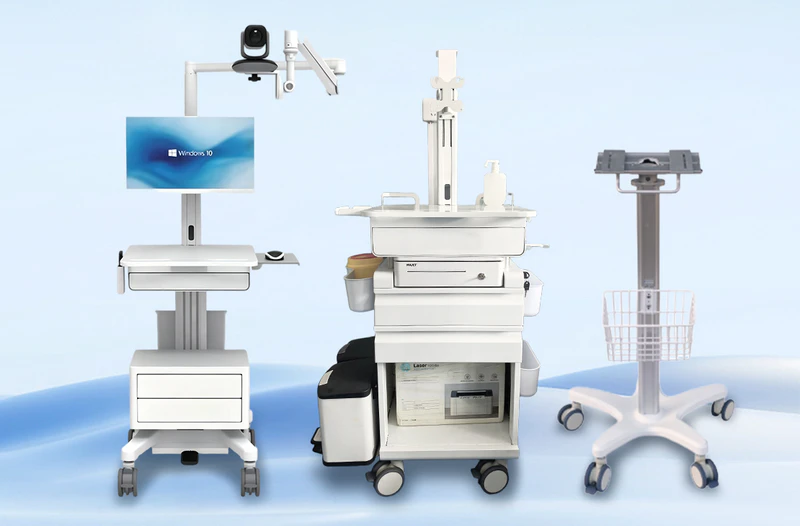
The Importance of Medical Computer Carts in Hospitals
Medical computer carts improve patient care, streamline clinical workflows, and reduce documentation errors by bringing electronic health records directly to the bedside.
Better Patient Care and Accuracy
- Real-time data entry: Doctors and nurses update electronic health records right during patient visits, which stops memory-based mistakes.
- Bedside scanning: Staff scan patient wristbands and medications on the spot to ensure safe delivery.
- Stronger human connection: Caregivers look at patients while typing instead of turning away to find a fixed computer.
Workflow and Time Savings
- Less walking: Portable carts save hours each week by cutting down trips to central nursing stations.
- Instant communication: Lab results and chart updates load instantly from anywhere in the facility.
- Supplies on hand: Storage trays hold tools, vital sign monitors, and medications within arm’s reach.
Safety and Security
- Data privacy: Screens face away from public view, helping hospitals meet data protection rules.
- Ergonomic design: Height-adjustable frames prevent back and neck strain for workers of different heights.
- Clean builds: Smooth, antimicrobial surfaces limit germ spreading in busy medical areas.
Which Medical Computer Cart Fits Each Workflow?
| Solution | Best application | Main advantages |
|---|---|---|
| SH3-B-3-1 Ward Round Cart | General ward rounds | Pneumatic adjustment, VESA mount, compact design |
| SH1-1-1 Laptop Medical Cart | Laptop-based documentation | Supports 12–17-inch laptops, mouse tray |
| SH2-D-2-3-2 Tablet Medical Cart | Bedside tablet access | 9 kg cart, adjustable tablet holder |
| SH3-A-8-1 Nursing Trolley | Integrated nursing workflow | Monitor mount, drawers, bins and storage |
Best General-Purpose Medical Computer Cart
The SH3-B-3-1 Ward Round Cart is a balanced option for routine bedside documentation. It combines pneumatic height adjustment, an 8 mm aluminum worktop, a VESA-compatible monitor mount, an integrated mouse tray and 3-inch silent casters.
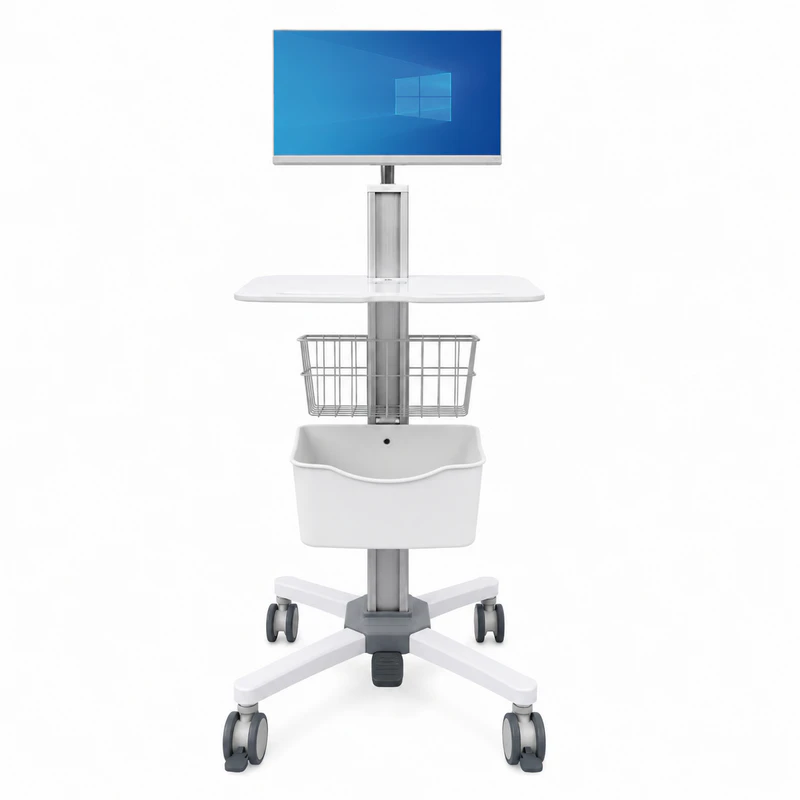
Its compact structure suits wards where clinicians must maneuver between beds, equipment and visitors. The pneumatic adjustment also allows staff to change the work height without relying on an electrical lifting mechanism. Hospitals should confirm the monitor weight, VESA pattern and required accessories before placing a fleet order (LUVXOM, accessed July 28, 2026).
Best Cart for Hospital Laptops
The SH1-1-1 is intended for hospitals that use existing laptops rather than a separate monitor and computer. Its platform supports 12–17-inch laptops and includes an integrated mouse tray, pneumatic height adjustment and 3-inch silent casters.
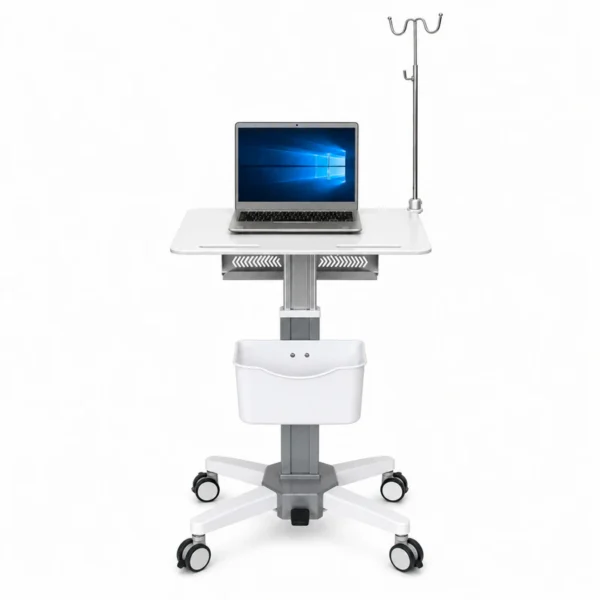
The 8 mm aluminum worktop provides a simple, cleanable surface, while the compact frame supports movement between patient rooms. LUVXOM states a maximum load capacity of 50 kg. Nevertheless, procurement teams should test the fully configured cart because stability depends on device position, accessory weight and center of gravity (LUVXOM, accessed July 28, 2026).
Best Compact Tablet Medical Cart
The SH2-D-2-3-2 is designed for tablet-based EMR access, patient information entry and digital rounds. It weighs approximately 9 kg and has a stated load capacity of 8 kg.
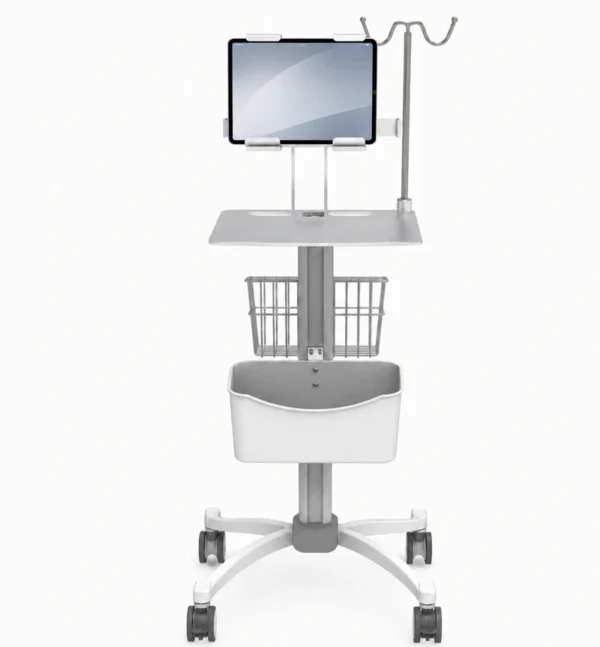
Its 350 × 370 mm worktop and 3-inch casters suit confined bedside areas. The adjustable holder accommodates tablets within a specified width, height and thickness range. Therefore, buyers should compare their device dimensions—including protective cases—against the published clamping limits before ordering (LUVXOM, accessed July 28, 2026).
Best Full Nursing Workstation
The SH3-A-8-1 combines computer-cart functions with organized clinical storage. It includes a constant-force monitor lifting system, keyboard tray, expansion table, multiple drawers, waste bins, tool storage and 4-inch medical casters.
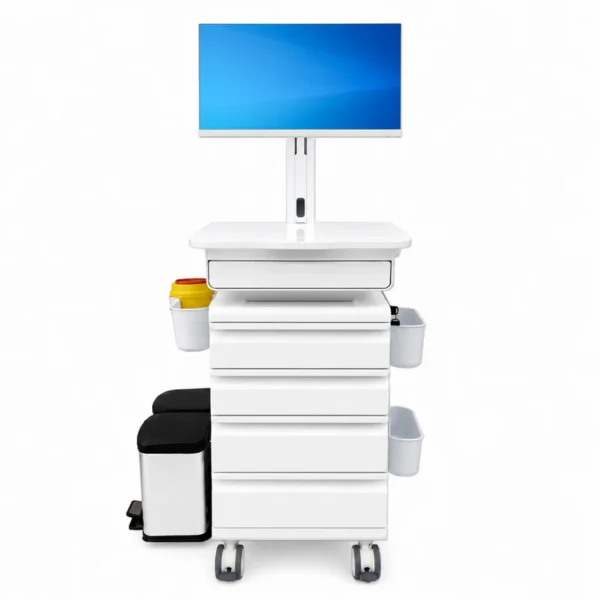
This configuration is appropriate when staff need more than digital documentation. It can support medication management, bedside care and the movement of frequently used supplies. Its stated load capacity is up to 50 kg. However, the larger structure should be tested in lifts, doorways, corridors and occupied patient rooms before hospital-wide deployment (LUVXOM, accessed July 28, 2026).
How Should Hospitals Evaluate Medical Computer Carts?
A purchase specification should address clinical use, physical performance and long-term ownership.
- Device compatibility: Confirm dimensions, weight, VESA pattern, cables and power requirements.
- Mobility: Test caster noise, braking, turning radius and movement across thresholds.
- Ergonomics: Assess the adjustment range for shorter and taller users in seated and standing positions.
- Cleaning: Verify compatibility with the hospital’s approved disinfectants and cleaning frequency.
- Storage: Define the required drawers, baskets, scanner holders, printer trays and waste containers.
- Serviceability: Check access to replacement casters, lifting components, mounts and spare parts.
In addition, procurement teams should request dimensional drawings, material specifications, inspection procedures, warranty conditions and packaging information.
Why Is a Pilot Deployment Necessary?
A sample cart should be evaluated by nurses, clinicians, infection-control staff, IT personnel, biomedical engineers and facilities teams. A short pilot can reveal practical problems that are not apparent in a quotation.
Tests should cover:
- Bedside maneuvering and braking
- Monitor and device stability
- Cable routing and connector access
- Cleaning and surface durability
- User posture during documentation
- Lift, doorway and storage-room clearance
- Assembly and maintenance requirements
Feedback should be documented using a consistent scorecard before the final configuration is approved.
Conclusion:
For general hospital procurement, the SH3-B-3-1 is the best balanced medical computer cart because it combines compact mobility, pneumatic height adjustment and VESA monitor compatibility. Hospitals requiring integrated storage should choose the SH3-A-8-1. The SH1-1-1 is the better laptop solution, while the SH2-D-2-3-2 suits lightweight tablet workflows.
The strongest procurement strategy is not to select one cart solely on price. Hospitals should standardize common components, run a clinical pilot and assign each configuration to a defined workflow. This approach improves usability, simplifies maintenance and reduces the risk of purchasing carts that do not fit real clinical conditions.


